Cut the filler.
Keep the flow.
Kill the Fill automatically removes filler words — um, uh, er, you know — plus hesitations and dead silences from your talking-head videos. Everything runs on your Mac. Nothing is ever uploaded.
Thanks — you're on the list. We'll email you the moment it launches.
Be first to know at launch · no spam, just one email when it's ready.
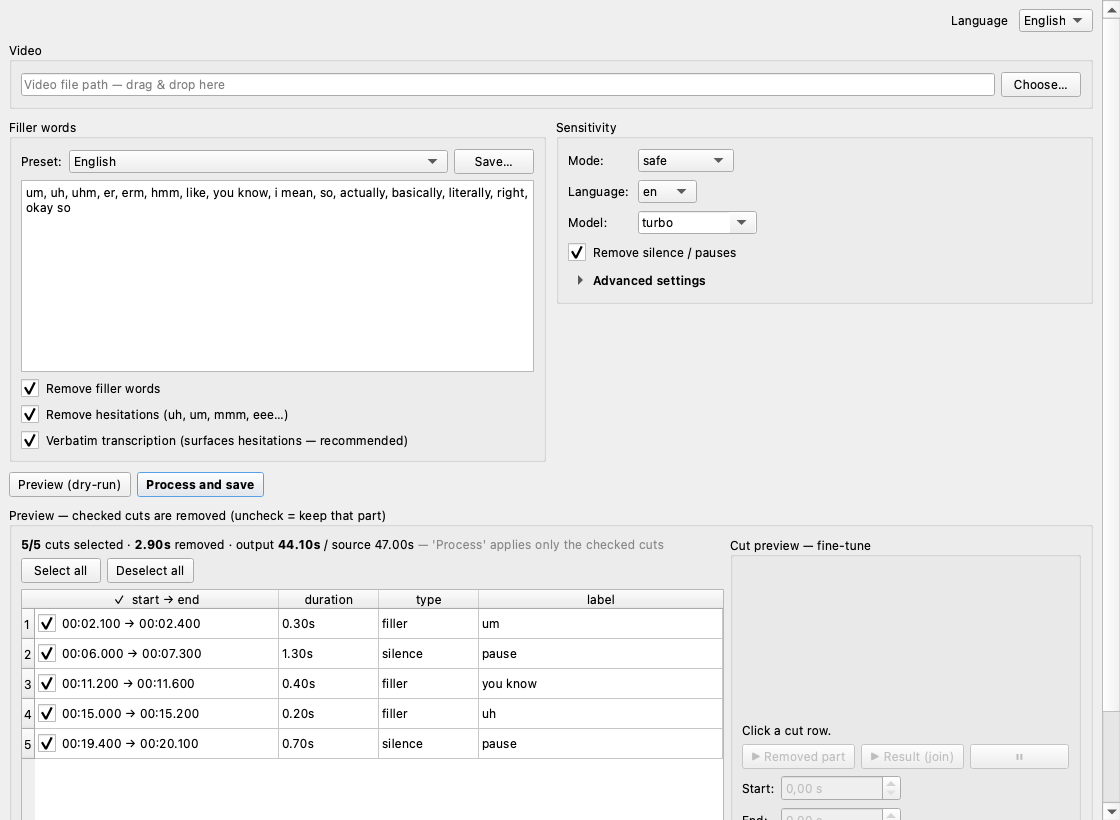
Tedious edits, done in seconds
Scrubbing through footage to delete every “um” and awkward pause is the worst part of editing. Let your Mac do it.
100% on your Mac
Transcription and editing run fully on-device. Your footage is never uploaded to any cloud.
Filler words & hesitations
Catches “um, uh, er, like, you know, I mean” — and the drawn-out hesitations most tools miss.
Silences & dead air
Trims long pauses and dead air, tightening your delivery without clipping real words.
You approve every cut
Preview the full cut list, untick anything you want to keep, fine-tune the in/out — then render.
Fast on Apple Silicon
Native MLX transcription and clean re-encoding — audio and video stay perfectly in sync.
English & 90+ languages
Works in English and dozens more — with your own editable filler list. Specially tuned for Turkish too.
Three steps to a tighter cut
Drop in a video
Drag your talking-head clip in and pick the spoken language and a filler preset.
Preview every cut
See exactly what will be removed and how much time you’ll save. Click any cut to hear it.
Save the clean video
Render a synced, click-free cut — keyframe-accurate, no desync, no audible pops.
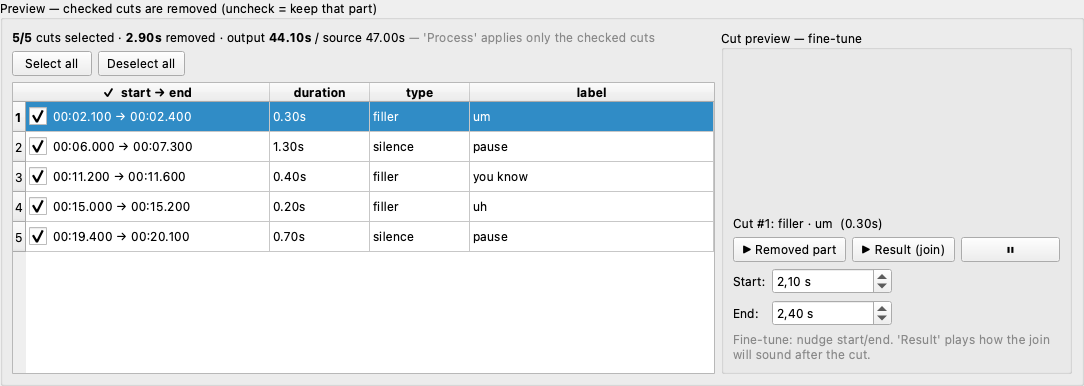
Review and fine-tune each cut before you commit — or untick it to keep that moment.
English, and 90+ more
Works in the world’s biggest languages — and it’s the only filler remover specially tuned for Turkish disfluencies.
Good to know
Does it really work offline?
Yes. Speech recognition and editing happen entirely on your Mac using Apple’s MLX framework and ffmpeg. Your video never leaves your machine — no upload, no account required to process.
Which Macs are supported?
Apple Silicon Macs (M1 and newer). The app is built and tuned natively for Apple Silicon.
What languages does it support?
It works great in English and supports 90+ languages via Whisper, with an editable filler-word list for any language. It’s also specially tuned for Turkish.
When does it launch, and how much will it cost?
It’s in private testing now. Join the waitlist and you’ll be the first to get it — early supporters get the best deal.
Will it ruin my audio or sync?
No. It re-encodes with a short crossfade at every join, so cuts are click-free and audio stays in sync with video.
Be first to kill the filler
Join the waitlist — we’ll email you the moment it’s ready.
Thanks — you're on the list. We'll be in touch at launch.